Badge Designer.
A parts-based editor for heraldic shield badges: pick a silhouette, pour colour into its fields, curve unit text around the crest, stamp a Swiss cross, drop artwork behind the fills, and export a self-contained vector SVG or a 4K PNG. An optional generate flow paints subjects from a text prompt on a local diffusion model.
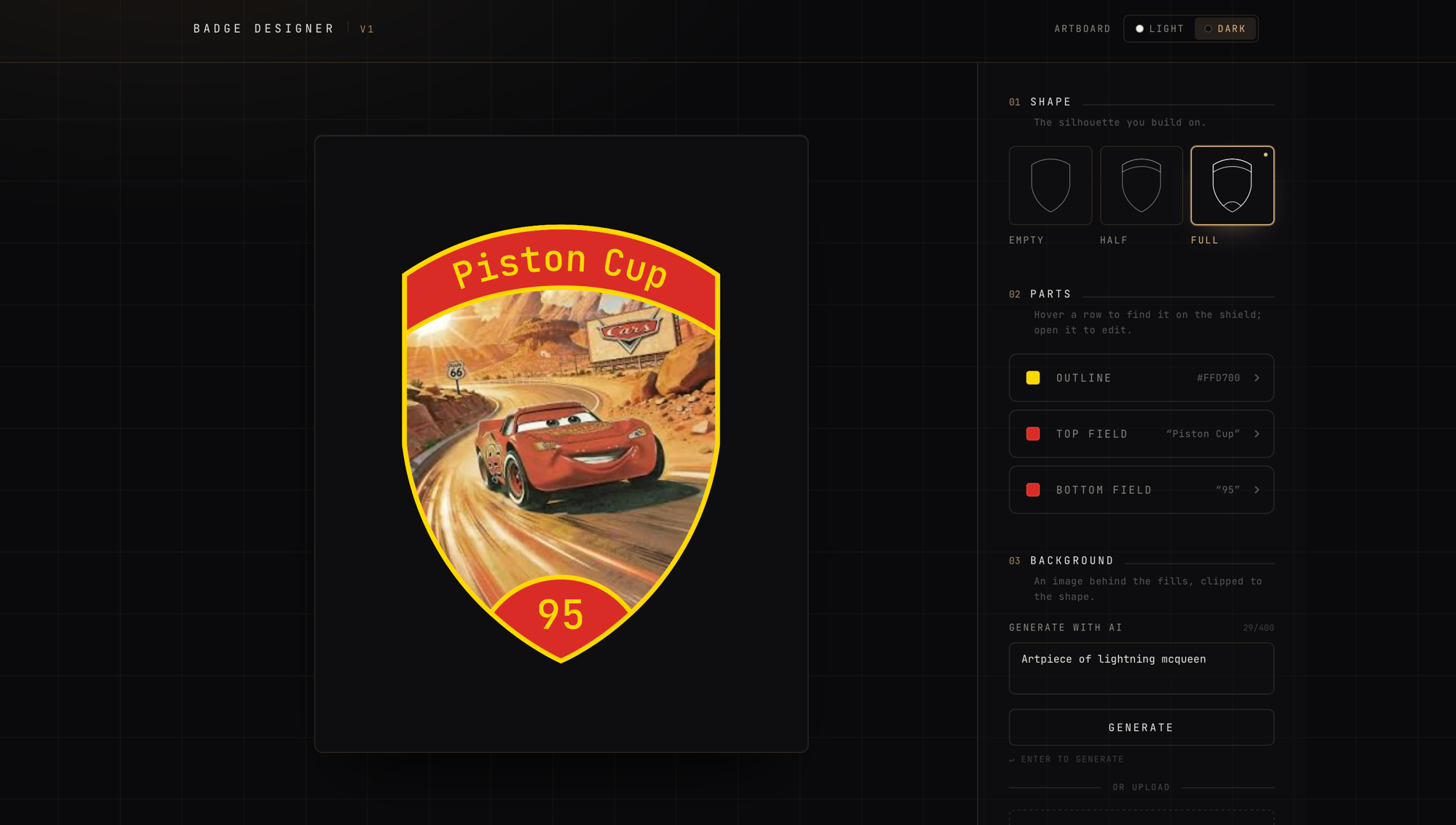
Badge Designer builds heraldic shield badges from parts rather than from a blank canvas. You pick one of three shield silhouettes, pour colour into each enclosed field, curve a unit name around the crest or stamp a Swiss cross to federal spec, slide artwork in behind the fills, and export the exact shield on screen as a self-contained vector SVG or a 4K PNG. It also has an optional generate flow that paints a badge subject straight from a text prompt, but that half runs entirely on a local diffusion model and is deliberately left out of the hosted app: I would rather ship it upload-only than rent a GPU so strangers can burn compute on a free hobby project.
The whole editor is organised around the badge's parts, not a settings panel. The three shield bases are line-art SVGs authored in Illustrator that all happen to share the same generated class names and clip-path id, so injecting their raw markup would collide the instant two were on the page. Instead each file is parsed once, its defs and style stripped, and only the geometry of the line paths kept, then classified by document order into an outline, an inner chin arc, and the top band. Everything downstream renders from that parsed data: the fields colour can be poured into, the spotlight that lights up the matching place on the shield the moment you hover its row, and the exporter. Stroke colour is driven live from React rather than baked into the source art, so the same read-only file paints any way you like.
Each of a shield's enclosed fields holds exactly one mark, a short line of text or an emblem and never both, modelled as a single union so the two states cannot both be true. The top band bends its text around an arc concentric with the crest's top edge, letters standing upright on the baseline and rising outward toward the rim, while the narrow bottom lens sets its text straight. Both auto-fit: a run that fits keeps the field's full size and simply grows outward from centre, and a longer one shrinks so its advance width stays pinned to the field, so the fit guarantee holds at any length. The Swiss cross is generated from the federal 32-unit square, four equal arms each a sixth longer than wide in exact 255/0/0 red on white, kept precise because it is artwork rather than UI chrome and should not be softened to the palette.
Export is the part that has to survive leaving the page. Rather than redraw the badge into a second copy, the exporter serialises the very SVG element on screen, so the downloaded file is byte-for-byte what you were looking at. Two things are inlined to make it stand alone anywhere: the one CSS custom property the lines are painted through, and the monospace font, base64-embedded face by face, because a bare SVG opened in another app cannot see next/font's stylesheet. Uploaded and generated artwork already lives as a data URL, so the result is a single self-contained vector file that scales without loss, and the PNG path rasterises that same SVG at a fixed 4096px longest edge for tools that only speak pixels.
The generate flow is the ambitious half, and it is entirely local. A prompt goes to the app's own Node route, which keeps the model's address on the server and speaks the AUTOMATIC1111 txt2img contract, the same one Draw Things' HTTP API implements, so a single code path drives either backend against a DreamShaper XL Turbo checkpoint tuned for few-step, low-guidance sampling. The user's words are never the whole prompt: they are wrapped in badge-shaped scaffolding, a bold cel-shaded style pinned on and a long negative prompt banning the things that wreck a crest, scenery, gradients, ornate borders, stray text, extra limbs. Because a diffusion model always wants to fill the frame, the returned image is shrunk into the centre of a same-size canvas whose margin is flood-filled from its own corner-sampled background colour, so the subject lands small with room to be dragged and scaled inside the shield, then re-enters the pipeline as if it were an ordinary upload. Cancelling in the browser aborts the fetch, which tears the upstream generation down with it instead of leaving a GPU grinding unwatched. The whole feature sits behind a build flag and is switched off in production, so the hosted build ships upload-only and the generator stays a local-dev tool.